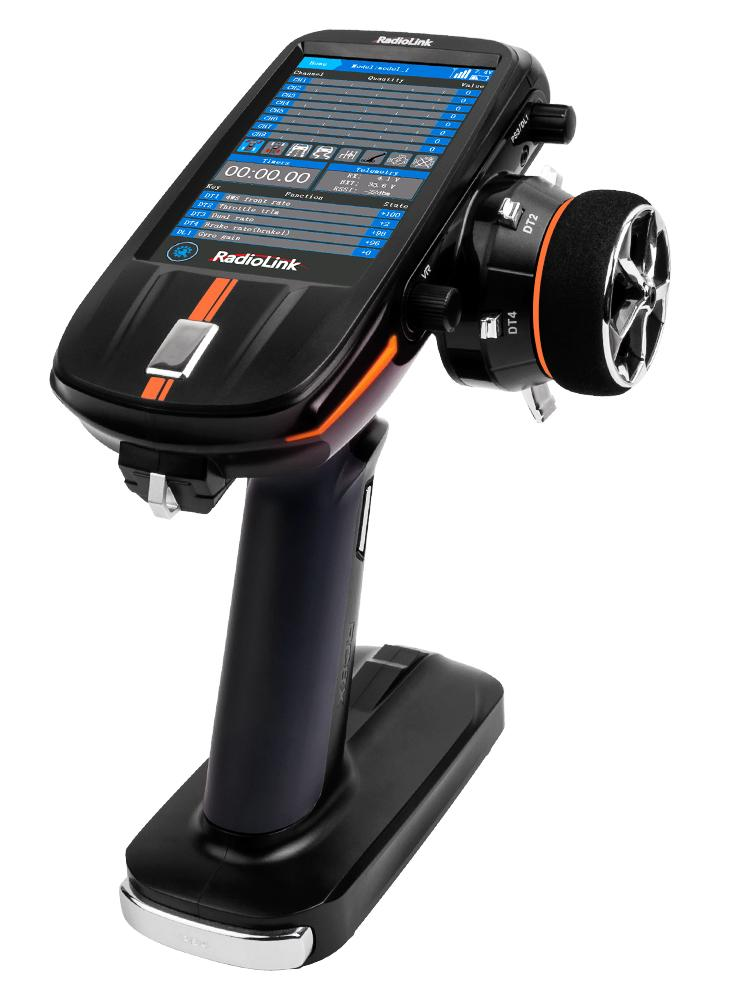
RC8X 日本語取扱説明書。
FHSS方式、8チャンネル・デジタルプロポーショナルRC送受信システム。RCカー、ボート、ロボットに対応します。
RC8X商品ページへ戻る
14歳未満の方には適していません。
第1章 送信機とR8FG受信機
第2章 基本機能
サポート・ご購入のお礼
1.1 安全上の注意
1.1.1 送信機の安全ガイドライン
1.1.2 SDカードの安全ガイドライン
1.2 RC8Xの概要
1.2.1 特長
1.2.2 仕様
1.2.3 パッケージ内容
1.2.4 ボタンの概要
1.2.5 ボタン名称
1.2.6 2ポジションスイッチ
1.2.7 3ポジションスイッチ
1.2.8 送信機の電源を入れる前の準備
1.2.8.1 送信機の電源
1.2.8.2 送信機の電源を入れる
1.2.8.3 言語選択
1.2.9 アイコンの概要
1.2.10 送信機低電圧アラーム
1.2.11 対応受信機
1.3 受信機の概要
1.3.1 R8FGの特長
1.3.2 バインド
1.3.3 受信機の接続
1.3.3.1 ケーブル接続
1.3.3.2 テレメトリー用R8FGの正しい接続方法
1.3.3.3 モデル低電圧アラーム設定
1.3.4 R8FGの動作モード
1.3.5 R8FGのジャイロ機能
1.3.6 受信機アンテナの取り付け
1.3.7 RSSI試験
2.1 システムメニュー(System menu)
2.1.1 言語(Language)
2.1.2 Theme setting
2.1.3 バックライト(Backlight)
2.1.4 サウンド(Sound)
2.1.5 バッテリー(送信機バッテリー電圧)
2.1.6 Vibration setting
2.1.7 LED setting
2.1.8 HOME button setting
2.1.9 External input output
2.1.10 校正(Calibration)
2.1.11 Information
2.2 基本メニュー(Basic menu)
2.2.1 チャンネルリバース(Channel reverse)
2.2.2 チャンネルディレイ(Channel Delay)
2.2.3 エンドポイント調整(EPA)
2.2.4 サブトリム(Sub trim)
2.2.5 Channel setting
2.2.6 Channel limiter
2.2.7 Trim/Dial select
2.2.8 Switch select
2.2.9 デュアルレート(Double Ratio)
2.2.10 フェイルセーフ(Fail-safe)
2.2.11 Receiver setting
2.2.12 Subsidiary ID mode
2.3 テレメトリー設定(Telemetry setting)
2.3.1 Receiver signal
2.3.2 Transmitter voltage
2.3.3 Receiver voltage
2.3.4 Engine battery voltage
2.3.5 Telemetry broadcast
2.4 レーシングメニュー(Racing menu)
2.4.1 ステアリングカーブ(Steering curve)
2.4.2 スロットルカーブ(Throttle curve)
2.4.3 ブレーキカーブ(Brake curve)
2.4.4 Acceleration
2.4.5 Steering delay
2.4.6 Throttle delay
2.4.7 クルーズコントロール(Cruise Control)
2.4.8 Idle up
2.4.9 Throttle Setting (Trigger)
2.4.10 Traction control (T.R.C)
2.4.11 A.B.S
2.4.12 Motor Start
2.4.13 Engine cut
2.5 ミキシングメニュー(Mixing menu)
2.5.1 Steering mixing
2.5.2 Brake mixing
2.5.3 Gyro mixing
2.5.4 4WS mixing
2.5.5 Dual ESC mixing
2.5.6 CPS mixing
2.5.7 Tank mixing
2.5.8 プログラマブルミキシング(Programmable mixing)
2.5.9 Tilt mixing
2.6 ツールメニュー(Tools menu)
2.6.1 Screenshot setting
2.6.2 タイマー(Timer)
2.6.3 Roll out chart
2.6.4 Gear ratio chart
2.7 モデル選択(Model select)
2.7.1 Model select
2.7.2 Copy model/Paste model
2.7.3 Rename model
2.7.4 Reset model
2.7.5 Delete model
2.7.6 Model data copy
2.8 SD Card Folder
2.8.1 SD Card Folder Name Introduction
2.8.2 SD Card Files Copy Methods
2.8.3 Note for SD card content modification
2.9 Modifying for Left-hand Use
2.9.1 Remove the Wheel
2.9.2 Remove the Wheel Installation Port Cover
2.9.3 Install Wheel
2.9.4 Install the Wheel Installation Port Cover
2.10 Wheel or Trigger Mechanical Adjustment
2.10.1 Trigger brake lever adjustment
2.10.2 Trigger tension screw adjustment
2.10.3 Trigger slide adjustment
2.10.4 Wheel tension screw adjustment
2.11 ファームウェア更新(Firmware Update)
2.11.1 Methods for Firmware Copy
2.11.2 Methods for Firmware Upgrade
2.12 カスタム音声の作成(Customized Voice Production)